A wholesale management software review should start where operational problems start: with the order that cannot ship because stock was allocated twice, the B2B customer asking for a custom price, or the warehouse team working from a spreadsheet that is already out of date. For wholesalers selling through direct channels, marketplaces, and retail partners, software is not just an admin tool. It is the operating system behind inventory accuracy, fulfillment speed, and profitable growth.

The right platform centralizes the workflows that usually fragment as a business expands: catalog data, stock movement, purchase orders, sales orders, customer terms, warehouse activity, and shipping. The wrong one simply adds another screen for your team to maintain.
What Wholesale Management Software Must Control
Wholesale operations have different requirements from a basic online store. A wholesale customer may order by SKU, purchase in cases or pallets, expect negotiated pricing, pay on terms, and request delivery to a specific warehouse or retail location. Meanwhile, the same inventory may be available to DTC shoppers on Shopify, customers on Amazon, and internal sales representatives.
That creates a single operational question: can the business trust its available inventory at every point of sale?
A capable system maintains one inventory picture while accounting for on-hand stock, committed stock, incoming purchase orders, damaged goods, warehouse transfers, and safety-stock rules. It should update channel availability quickly enough to reduce overselling without unnecessarily hiding sellable inventory. That balance matters. Aggressively reserving stock may protect wholesale commitments, but it can also limit sales on faster-moving retail channels if the rules are too rigid.
Order management is the second core requirement. Wholesale orders should flow into the same operational center as ecommerce orders, while still retaining their own logic: customer-specific price lists, minimum order quantities, payment terms, sales tax treatment, account notes, and approval workflows. Teams should not have to export orders from one platform, manually reformat them, and then re-enter them for fulfillment.
Wholesale Management Software Review: Features Worth Testing
A feature checklist is useful only when it maps to the work your team performs every day. During a wholesale management software review, test workflows using real products, customer accounts, warehouses, and order scenarios. A polished demo can hide the manual steps that appear once exceptions arrive.
Inventory and catalog control
Look for centralized product records that support multiple SKUs, barcodes, units of measure, variants, bundles, and channel-specific listing details. Wholesale teams often sell the same item individually online but by carton or case to business customers. The system needs clear unit conversions so a sale of six cases correctly reduces the underlying each-level inventory.
Catalog control also affects purchasing and replenishment. When supplier details, lead times, costs, and reorder rules are disconnected from sales history, buyers are forced to make decisions from partial data. Useful software brings purchasing into the same environment as demand, stock movement, and open orders.
Customer-specific B2B selling
Wholesale functionality should support more than a generic discount code. Evaluate whether the platform can manage customer groups, negotiated price lists, volume pricing, credit limits, tax settings, payment terms, and order minimums. These controls reduce back-and-forth between sales, finance, and operations while helping customers place accurate orders independently.
The best approach depends on your sales model. If orders are primarily entered by an internal sales team, fast order entry and account-level rules may be the priority. If customers place recurring orders themselves, a branded B2B portal with approved catalogs and pricing becomes more valuable. Many growing distributors need both.
Warehouse execution and shipping
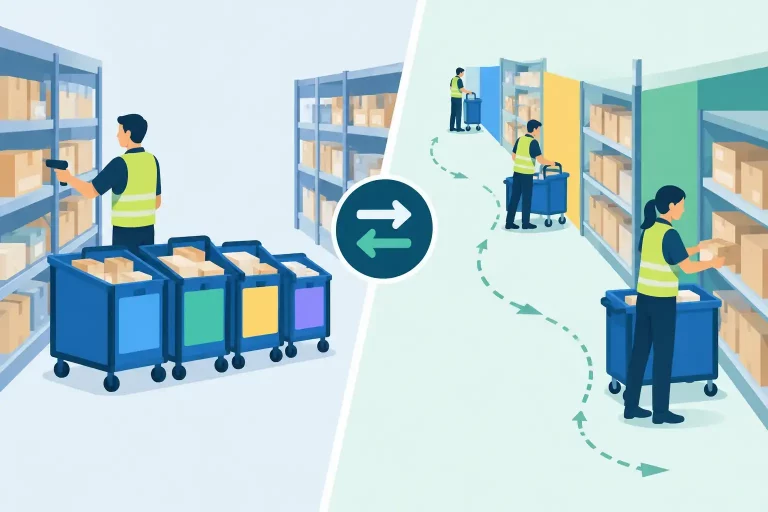
Software should make the warehouse faster, not create more clicks at the packing bench. Review how it handles picking, packing, barcode scanning, partial fulfillment, backorders, returns, warehouse transfers, and shipping labels. The platform should give staff clear instructions on what to pick, where to find it, and which orders need attention first.
Shipping capability matters because wholesale deliveries do not always follow parcel rules. Some orders ship as individual cartons through common carriers; others require freight coordination, pallet details, and shipment documentation. A business may not need every freight feature on day one, but it should avoid choosing a system that forces a second manual process when larger orders become more common.

Integrations and data flow
Integration depth determines whether the platform becomes a source of truth or another silo. Check how it connects with storefronts, marketplaces, carriers, accounting systems, payment tools, and warehouse technology. More importantly, ask what data moves in each direction and how often.
For example, pushing inventory from one system to a marketplace is not enough if canceled orders, returns, tracking details, product updates, and cost changes remain disconnected. Confirm how the system handles sync failures, duplicate orders, SKU mismatches, and channel-specific exceptions. These are the issues that consume operations time after implementation.
Questions That Reveal the Real Fit
Before selecting software, map one complete order lifecycle. Start with receiving a purchase order, then move through inventory receipt, customer order creation, allocation, picking, shipment, invoicing, and return handling. Ask the vendor to show each step rather than describe it.
Pay close attention to permissions and audit trails. As volume grows, different people need different levels of access. Warehouse staff may need to confirm picks but not edit prices. Sales teams may create orders but require approval when a customer exceeds a credit limit. Managers need visibility into adjustments, cancellations, and changes that affect margin or inventory accuracy.
Reporting deserves the same scrutiny. Operations leaders need practical answers: Which items are allocated but not shipped? Which customers are buying less than usual? Which warehouse has stock? Which purchase orders are overdue? Which channels are selling inventory faster than expected? A report is only valuable if it uses current data and helps someone make a decision without building a spreadsheet from scratch.
Implementation should also be part of the review. Migrating product data, customer records, pricing rules, and inventory counts requires discipline. The platform may be capable, but poor opening data will create confusion from day one. Plan time for SKU cleanup, unit-of-measure validation, warehouse location setup, and user training. Start with the workflows that create the highest operational risk, then expand automation after the team has verified the data.
Where Simpler Tools Stop Working
Spreadsheets, standalone shipping tools, and separate B2B portals can support an early-stage wholesale business. They are familiar, inexpensive, and flexible for a small number of orders. The trade-off is that people become the integration layer. They reconcile inventory, copy order details, chase shipping updates, and investigate discrepancies across systems.
That model becomes expensive when order volume, warehouse locations, sales channels, or product complexity increase. Overselling is only one cost. There are also late shipments, incorrect invoices, purchasing mistakes, labor spent on rework, and poor customer communication when teams cannot see a complete order status.
A centralized commerce operations platform such as eSwap is designed for this transition. It brings multichannel orders, inventory, warehouse workflows, shipping, purchasing, and B2B wholesale operations into one operational dashboard, so teams can manage exceptions before they become customer problems.
Choose for the Next Operating Model
The best software is not necessarily the one with the longest feature list. It is the one that gives your team control over the workflows that currently slow growth while leaving room for the channels, warehouses, and customer requirements you expect next.
Test it against a real wholesale order, a real inventory discrepancy, and a real fulfillment deadline. If the system gives every team the same current answer without manual reconciliation, it is doing the work that wholesale management software should do.